산업 응용 분야
케이블 타이 수갑 안전하게 만드는 방법 DIY 가이드
케이블 타이 수갑과 필수 안전 이해: 케이블 타이 수갑이란 무엇인가요? 케이블 타이 수갑—종종 지퍼 타이 수갑 또는 수갑 지퍼 타이로 불림—은 고강도 플라스틱 잠금장치로 만든 임시 물리적 구속장치입니다. 일반 경찰용 금속 수갑과 달리, 이 구속장치는 산업용 타이의 맞물림 트랙과 잠금 래칫 메커니즘을 이용하여 안전하게 고정됩니다. […]
더 읽기

Organized cable management relies heavily on visual identification. While cable ties primarily function as mechanical fasteners to secure bundles, using coloured cable ties transforms passive infrastructure into an instantly readable visual map. Understanding how regulatory standards interact with practical site conventions is essential for designing clean, compliant, and serviceable installations.
| 파라미터 | Regulatory Standards (NEC, IEC, TIA) | Site Conventions (Internal SOPs) |
|---|---|---|
| Primary Scope | Conductor insulation, phase tape, safety labels | Bundling, routing, system demarcation |
| Enforcement | Legally binding by local electrical code | Facility-specific, contract-driven |
| Fastener Rules | Rarely specifies cable tie color | Defines specific color-coded zip ties by function |
| Primary Goal | Shock prevention, fire safety, grounding | Tracing speed, system isolation, maintenance |
Regulatory codes focus almost exclusively on conductor insulation and terminal markings:
National Electrical Code (NEC): Enforces strict color rules for grounded (neutral) conductors and equipment grounding conductors. It leaves fastener selection to mechanical support guidelines.
IEC 60445 (which superseded IEC 60446) / EN 60204-1: Dictates color usage for AC/DC power conductors within industrial machinery, mandating protective earth (PE) and neutral colors without prescribing tie wrap colors.
Telecommunications Standards (TIA-606): Recommends visual color schemes for termination fields, patch cords, and pathway labels, but does not mandate specific colors for the physical ties bundling the cables.
Industry standards dictate how conductors must be identified to prevent electrical hazards. They do not dictate the color of the fastener holding the cable bundle together.
Because international and national codes stop at the conductor insulation, facility managers and systems integrators develop internal site conventions. These site-level standard operating procedures (SOPs) establish uniform rules for colour-coded zip ties across server rooms, production floors, and junction boxes.
Site conventions bridge the gap between general code compliance and practical facility management:
cURL Too many subrequests by single Worker invocation. To configure this limit, refer to https://developers.cloudflare.com/workers/wrangler/configuration/#limits
cURL Too many subrequests by single Worker invocation. To configure this limit, refer to https://developers.cloudflare.com/workers/wrangler/configuration/#limits
| cURL Too many subrequests by single Worker invocation. To configure this limit, refer to https://developers.cloudflare.com/workers/wrangler/configuration/#limits | cURL Too many subrequests by single Worker invocation. To configure this limit, refer to https://developers.cloudflare.com/workers/wrangler/configuration/#limits | cURL Too many subrequests by single Worker invocation. To configure this limit, refer to https://developers.cloudflare.com/workers/wrangler/configuration/#limits | cURL Too many subrequests by single Worker invocation. To configure this limit, refer to https://developers.cloudflare.com/workers/wrangler/configuration/#limits |
|---|---|---|---|
| 블랙 | cURL Too many subrequests by single Worker invocation. To configure this limit, refer to https://developers.cloudflare.com/workers/wrangler/configuration/#limits | cURL Too many subrequests by single Worker invocation. To configure this limit, refer to https://developers.cloudflare.com/workers/wrangler/configuration/#limits | cURL Too many subrequests by single Worker invocation. To configure this limit, refer to https://developers.cloudflare.com/workers/wrangler/configuration/#limits |
| 자연색 / 흰색 | cURL Too many subrequests by single Worker invocation. To configure this limit, refer to https://developers.cloudflare.com/workers/wrangler/configuration/#limits | 표준 폴리아미드 66 | cURL Too many subrequests by single Worker invocation. To configure this limit, refer to https://developers.cloudflare.com/workers/wrangler/configuration/#limits |
| 레드 | cURL Too many subrequests by single Worker invocation. To configure this limit, refer to https://developers.cloudflare.com/workers/wrangler/configuration/#limits | 난연성 나일론 66 | cURL Too many subrequests by single Worker invocation. To configure this limit, refer to https://developers.cloudflare.com/workers/wrangler/configuration/#limits |
| 파랑 | cURL Too many subrequests by single Worker invocation. To configure this limit, refer to https://developers.cloudflare.com/workers/wrangler/configuration/#limits | cURL Too many subrequests by single Worker invocation. To configure this limit, refer to https://developers.cloudflare.com/workers/wrangler/configuration/#limits | cURL Too many subrequests by single Worker invocation. To configure this limit, refer to https://developers.cloudflare.com/workers/wrangler/configuration/#limits |
| cURL Too many subrequests by single Worker invocation. To configure this limit, refer to https://developers.cloudflare.com/workers/wrangler/configuration/#limits | cURL Too many subrequests by single Worker invocation. To configure this limit, refer to https://developers.cloudflare.com/workers/wrangler/configuration/#limits | cURL Too many subrequests by single Worker invocation. To configure this limit, refer to https://developers.cloudflare.com/workers/wrangler/configuration/#limits | cURL Too many subrequests by single Worker invocation. To configure this limit, refer to https://developers.cloudflare.com/workers/wrangler/configuration/#limits |
| 노란색 | cURL Too many subrequests by single Worker invocation. To configure this limit, refer to https://developers.cloudflare.com/workers/wrangler/configuration/#limits | cURL Too many subrequests by single Worker invocation. To configure this limit, refer to https://developers.cloudflare.com/workers/wrangler/configuration/#limits | cURL Too many subrequests by single Worker invocation. To configure this limit, refer to https://developers.cloudflare.com/workers/wrangler/configuration/#limits |
| 초록색 | cURL Too many subrequests by single Worker invocation. To configure this limit, refer to https://developers.cloudflare.com/workers/wrangler/configuration/#limits | cURL Too many subrequests by single Worker invocation. To configure this limit, refer to https://developers.cloudflare.com/workers/wrangler/configuration/#limits | cURL Too many subrequests by single Worker invocation. To configure this limit, refer to https://developers.cloudflare.com/workers/wrangler/configuration/#limits |
| 주황색 | cURL Too many subrequests by single Worker invocation. To configure this limit, refer to https://developers.cloudflare.com/workers/wrangler/configuration/#limits | cURL Too many subrequests by single Worker invocation. To configure this limit, refer to https://developers.cloudflare.com/workers/wrangler/configuration/#limits | cURL Too many subrequests by single Worker invocation. To configure this limit, refer to https://developers.cloudflare.com/workers/wrangler/configuration/#limits |
| cURL Too many subrequests by single Worker invocation. To configure this limit, refer to https://developers.cloudflare.com/workers/wrangler/configuration/#limits | cURL Too many subrequests by single Worker invocation. To configure this limit, refer to https://developers.cloudflare.com/workers/wrangler/configuration/#limits | cURL Too many subrequests by single Worker invocation. To configure this limit, refer to https://developers.cloudflare.com/workers/wrangler/configuration/#limits | cURL Too many subrequests by single Worker invocation. To configure this limit, refer to https://developers.cloudflare.com/workers/wrangler/configuration/#limits |
| cURL Too many subrequests by single Worker invocation. To configure this limit, refer to https://developers.cloudflare.com/workers/wrangler/configuration/#limits | cURL Too many subrequests by single Worker invocation. To configure this limit, refer to https://developers.cloudflare.com/workers/wrangler/configuration/#limits | cURL Too many subrequests by single Worker invocation. To configure this limit, refer to https://developers.cloudflare.com/workers/wrangler/configuration/#limits | cURL Too many subrequests by single Worker invocation. To configure this limit, refer to https://developers.cloudflare.com/workers/wrangler/configuration/#limits |
cURL Too many subrequests by single Worker invocation. To configure this limit, refer to https://developers.cloudflare.com/workers/wrangler/configuration/#limits nylon cable ties selection guide.
The choice between black and clear/white fasteners comes down to physics, not just aesthetics.
Black ties owe their durability to carbon black particles integrated directly into the polymer matrix. We engineer these using uv stabilized nylon to absorb destructive radiation, preventing polymer chains from cracking under heavy sunlight. Whether securing commercial cable bundle sizes on rooftops or along exterior utility trays, black ties are the industry default for outdoor exposure.
Natural and white ties use unmodified polyamide 66. They offer clean aesthetics inside residential distributions, switchgear, and enclosed junction boxes. However, standard natural ties discolour and embrittle when exposed to continuous outdoor sunlight.
For projects requiring consistent mechanical performance indoors and out, our line of 검은색과 흰색 나일론 케이블 타이 balances structural retention with dependable minimum loop tensile ratings.
When a technician opens an industrial cabinet, primary colored cable ties act as instant functional warnings:
Secondary colors serve specialized workflows across complex infrastructure projects:
At WANDU, we supply coloured cable ties manufactured to high-precision pigments, ensuring clean contrast, rapid circuit tracing, and batch-to-batch tensile consistency verified in our own testing.
When implementing cable tie color coding: standards and site conventions, different industries rely on their own practical rules. While formal standards often specify wire insulation or patch cord sheathing, site engineers routinely adapt these palettes to their fasteners to streamline maintenance and protect critical pathways.
ANSI/TIA-606 sets out a recommended colour scheme for administration labels, patch fields and terminations — not the mechanical ties holding the bundles together. However, network engineers mirror these guidelines using color coded zip ties to identify functional pathways at a glance across dense server racks and cable trays.
Fibre cable jackets follow a different standard: TIA-598 assigns yellow to single-mode, orange to OM1/OM2, aqua to OM3 and violet to OM4. Installers often mirror those jacket colours on ties, but the jacket standard says nothing about fasteners.
Using color-matched ties alongside standardized labels prevents confusion during routine patch reconfiguration and reduces the risk of cutting the wrong tie during service calls.
In commercial construction, NEC 210.5(C) requires ungrounded conductors to be identified by phase and voltage system in buildings with more than one voltage system; grounded conductors fall under 200.6 and equipment grounding conductors under 250.119. None of these rules address fastener colour.
To bridge this gap, field teams use site-level conventions:
cURL Too many subrequests by single Worker invocation. To configure this limit, refer to https://developers.cloudflare.com/workers/wrangler/configuration/#limits
cURL Too many subrequests by single Worker invocation. To configure this limit, refer to https://developers.cloudflare.com/workers/wrangler/configuration/#limits
cURL Too many subrequests by single Worker invocation. To configure this limit, refer to https://developers.cloudflare.com/workers/wrangler/configuration/#limits 내구성 있는 나일론 케이블 타이 cURL Too many subrequests by single Worker invocation. To configure this limit, refer to https://developers.cloudflare.com/workers/wrangler/configuration/#limits
cURL Too many subrequests by single Worker invocation. To configure this limit, refer to https://developers.cloudflare.com/workers/wrangler/configuration/#limits
cURL Too many subrequests by single Worker invocation. To configure this limit, refer to https://developers.cloudflare.com/workers/wrangler/configuration/#limits
cURL Too many subrequests by single Worker invocation. To configure this limit, refer to https://developers.cloudflare.com/workers/wrangler/configuration/#limits 자동차 배선 하네스를 최적화하기 위한 나일론 케이블 타이 cURL Too many subrequests by single Worker invocation. To configure this limit, refer to https://developers.cloudflare.com/workers/wrangler/configuration/#limits
cURL Too many subrequests by single Worker invocation. To configure this limit, refer to https://developers.cloudflare.com/workers/wrangler/configuration/#limits
cURL Too many subrequests by single Worker invocation. To configure this limit, refer to https://developers.cloudflare.com/workers/wrangler/configuration/#limits
cURL Too many subrequests by single Worker invocation. To configure this limit, refer to https://developers.cloudflare.com/workers/wrangler/configuration/#limits
cURL Too many subrequests by single Worker invocation. To configure this limit, refer to https://developers.cloudflare.com/workers/wrangler/configuration/#limits
cURL Too many subrequests by single Worker invocation. To configure this limit, refer to https://developers.cloudflare.com/workers/wrangler/configuration/#limits
cURL Too many subrequests by single Worker invocation. To configure this limit, refer to https://developers.cloudflare.com/workers/wrangler/configuration/#limits
cURL Too many subrequests by single Worker invocation. To configure this limit, refer to https://developers.cloudflare.com/workers/wrangler/configuration/#limits
Limit the active site palette to four or five functional colors. Overcomplicating the scheme with ten different shades leads to operator confusion, inventory mix-ups, and eventual non-compliance during routine operations.
Color coding serves as an instant visual cue, but an auditor requires verifiable documentation. An effective cable management standard relies on clear site operating procedures:
Audit compliance extends beyond color choice to the physical installation quality. Poorly tensioned fasteners or jagged tail cuts signal substandard craftwork:
No universal international standard legally mandates cable tie colors across every industry. Most electrical and telecom standards, such as the NEC or TIA-606, govern wire insulation colors and physical labeling requirements rather than the fasteners themselves. Because of this, facility-level site conventions bridge the gap. Black is universally treated as the benchmark for UV-resistant exterior runs, while high-visibility coloured cable ties are deployed to map out data, security, and low-voltage circuits systematically.
Red cable ties designate critical, emergency, or high-risk circuits. Common applications include:
Fire alarm systems and smoke detection cabling
Emergency stop (E-stop) interlock circuits
Primary high-voltage containment lines
Backup emergency generator power feeds
In security-focused facilities, red ties also serve as temporary inspection tags to identify bundles requiring engineering review.
Standard colored ties molded from baseline polyamide 66 will experience color shift and polymer degradation when exposed to continuous direct UV radiation. Unlike outdoor-rated black ties formulated with carbon black, typical colorants do not block ultraviolet rays. While they maintain adequate fade resistance in indoor environments, prolonged outdoor exposure will break down the polymer chains, significantly dropping the tie's minimum loop tensile rating. For outdoor installations, always specify UV-stabilized nylon.
No. Color coding provides rapid visual reference, but it does not fulfill regulatory lockout/tagout (LOTO) requirements. Safety compliance frameworks require verified physical energy isolation, padlocks, and standardized warning tags. While color coded zip ties can visually designate disconnected circuits, they must never replace mechanical locks. For secondary asset tracking and visual verification, engineering teams frequently combine color standards with custom printed cable ties displaying serial numbers, dates, or department codes.
Yes. Beyond standard inventory and assorted colour packs, we manufacture ties tailored to precise site-wide specifications. Custom colour matching can be produced against standard RAL colour chart references or Pantone targets. This ensures your cable management hardware matches corporate branding, original equipment manufacturer (OEM) chassis finishes, or proprietary plant-floor identification schemes, all scaled to your required cable bundle size and tensile specifications.
완두에 대하여 — Zhejiang Wandu Plastic Co., Ltd. has produced nylon cable ties in Yueqing, Zhejiang, China since 2011. Our ISO 9001 certified factory runs 10 high-speed injection moulding machines and 8 professional cable tie test benches, covering nylon cable ties, stainless steel cable ties, cable clips, cable glands and spiral wrap. Products are CE and RoHS compliant and ship to buyers in 50+ countries. Every technical question below is answered by our own engineering team.

케이블 타이 수갑과 필수 안전 이해: 케이블 타이 수갑이란 무엇인가요? 케이블 타이 수갑—종종 지퍼 타이 수갑 또는 수갑 지퍼 타이로 불림—은 고강도 플라스틱 잠금장치로 만든 임시 물리적 구속장치입니다. 일반 경찰용 금속 수갑과 달리, 이 구속장치는 산업용 타이의 맞물림 트랙과 잠금 래칫 메커니즘을 이용하여 안전하게 고정됩니다. […]
더 읽기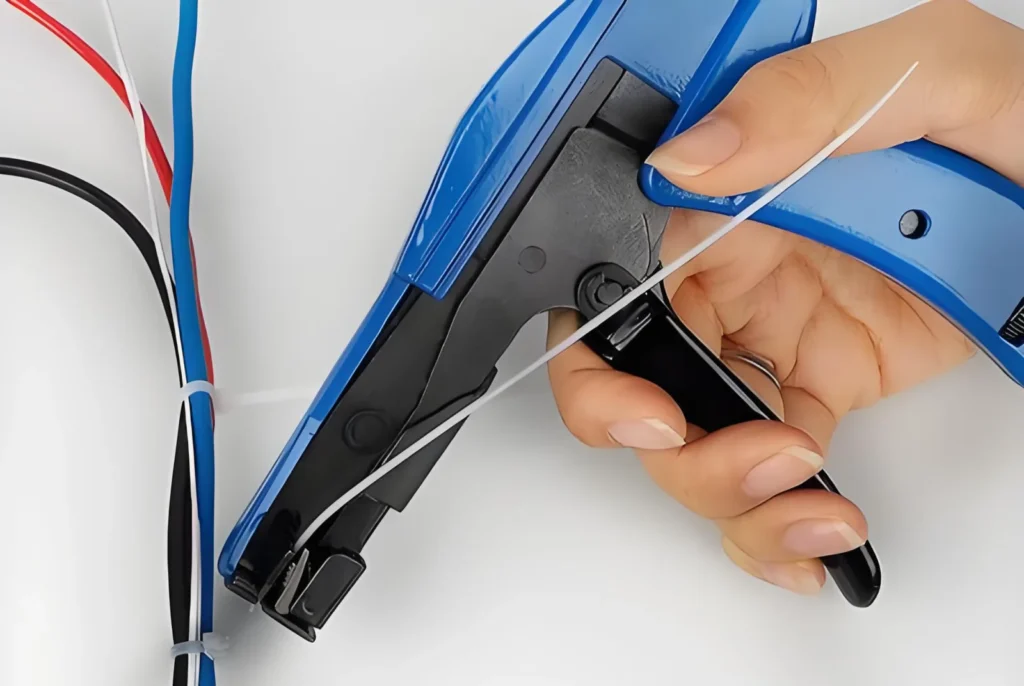
대형 케이블 묶음을 손으로 꽉 잡아 당기거나 묶고 나서 손가락이 아프거나 끝이 날카롭고 찌를 듯한 꼬리가 남아 누군가를 베일 위험이 있었던 적이 있나요? 더 나은 방법이 있습니다. 대규모 산업 배선 개편을 관리하거나 지저분한 서버 랙을 정리하려 할 때, 지퍼 타이 […]
더 읽기
 KO
KO  EN
EN  AR
AR  ES
ES  PT
PT  FR
FR  RU
RU  DE
DE  JA
JA  IT
IT  NL
NL  TR
TR